
Hey traders! If you're looking to tweak your trading strategy, the latest updates for the RSI Custom Smoothing indicator on MetaTrader 5 might just be what you need. Let’s dive into what’s new!
New Input Parameters
Here’s what you can customize now:
- Color: Choose the color of the main line for better visibility.
- Width: Adjust the width of the main line to suit your style.
- Levels: Set the two indicator levels to your preference.
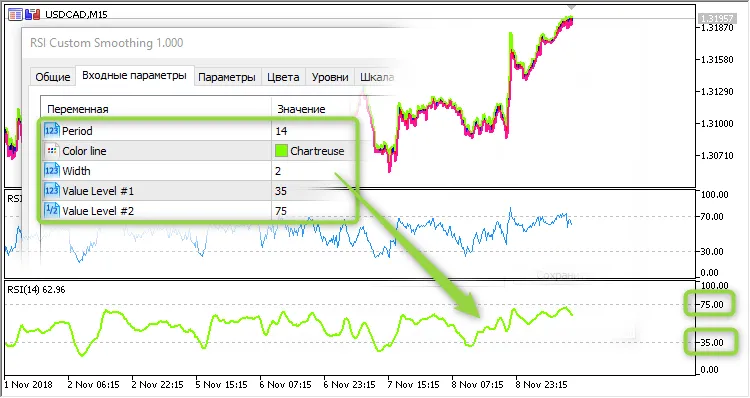
So, what's the scoop on these updates? Well, you can now manage indicator levels and colors directly from your Expert Advisor (EA). This is a game-changer during visual testing. For instance, if your EA is set to use non-standard levels like 35 and 75, those will show up on your chart when you’re testing the RSI Custom Smoothing.
Additionally, we've added indicator buffer smoothing using a simple averaging method with a period of 6. This means your signals will be smoother and potentially more reliable.
How to Create an Indicator Handle
If you're coding your EA, here’s a quick example of how to create an indicator handle:
//--- create handle of the indicator iRSI
   handle_iCustom=iCustom(m_symbol.Name(),Period(),"RSI Custom Smoothing",Inp_RSI_Period,
                          Inp_RSI_Color,Inp_RSI_Width,Inp_RSI_Level1,Inp_RSI_Level2);
//--- if the handle is not created
   if(handle_iCustom==INVALID_HANDLE)
     {
      //--- report the failure and output the error code
      PrintFormat("Failed to create handle of the iRSI indicator for the symbol %s/%s, error code %d",
                  m_symbol.Name(),
                  EnumToString(Period()),
                  GetLastError());
      //--- stop the indicator early
      return(INIT_FAILED);
     }
With these updates, your trading experience can become more tailored to your needs. Happy trading!




Comments 0