
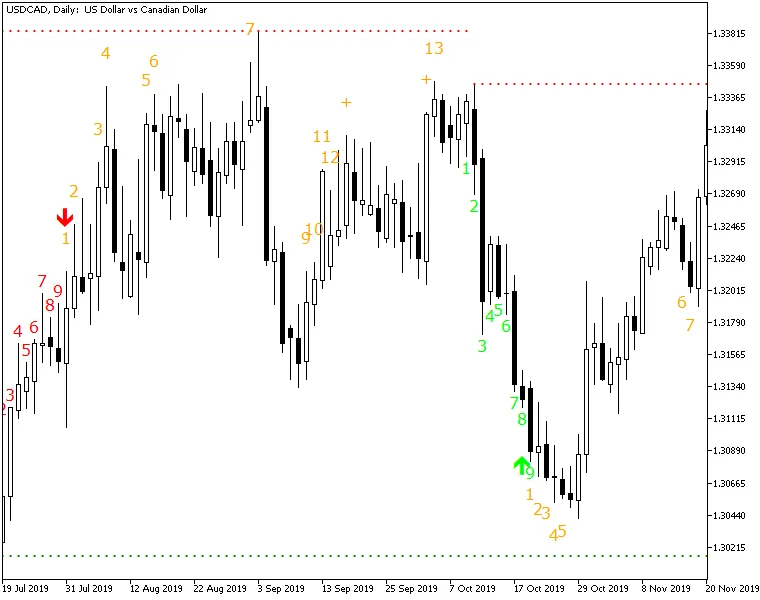
Unlock the Power of the TD Sequential Ultimate Indicator on MetaTrader 4! This nifty tool showcases the complete TD Sequential method crafted by the renowned technical analyst, Tom DeMark. With the TD Sequential Ultimate, you can easily spot Buy and Sell Setups, complete with Setup Perfection arrows, Countdown phases, and even failed attempt counts (yes, those pesky count 13s!). Plus, it highlights TDST Support and Resistance levels to help you navigate the markets more effectively.
What sets this indicator apart from the rest? Let's dive into the enhancements that make it a must-have for traders:
Input Parameters
Calculation
- MaxBars (default = 1000) — This parameter determines how many bars the TD Sequential will analyze. Setting it to zero means it will check all available bars, but keep in mind that a higher number may slow down the indicator.
Display
- BuySetupColor (default = clrLime) — Customize the color for Buy Setup counts and Perfection arrows.
- SellSetupColor (default = clrRed) — Choose the color for Sell Setup counts and Perfection arrows.
- CountdownColor (default = clrOrange) — This sets the color of the Countdown values.
- FontFace (default = "Verdana") — Select the font for your counts.
- FontSize (default = 12) — Adjust the size of your counts as needed.
- ArrowWidth (default = 2) — Define the arrow size for Setup Perfection.
- PixelDistance (default = 3) — Control the vertical distance between count objects in pixels.
- Prefix (default = "TDS_") — Set a text prefix for naming your chart objects.
Alerts
- AlertOnSetup (default = false) — Get a notification when a Buy/Sell Setup is completed (when count #9 shows up).
- AlertOnPerfecting (default = false) — Receive an alert when the Buy/Sell Setup is perfected (an arrow appears).
- AlertOnCount13 (default = false) — Be notified when Countdown candle #13 pops up.
- AlertOnSupportResistance (default = false) — Alerts you when a candle closes above resistance or below support.
- AlertNative (default = false) — If set to true, a native popup alert will appear whenever an alert event occurs.
- AlertEmail (default = false) — If true, alerts will be sent to your email. Make sure your email is configured correctly in MetaTrader via Tools->Options->Email.
- AlertNotification (default = false) — If true, you will receive push notifications on your mobile device. Don’t forget to set up the MetaQuotes ID in MetaTrader via Tools->Options->Notifications.




Comments 0