
The Unity indicator is a powerful tool for traders using MetaTrader 5, designed to visualize the synchronized movements of metals and major currencies. It first made waves in the trading community with the article "Practical Use of Kohonen Neural Networks in Algorithmic Trading. Part II. Optimizing and forecasting".
At its core, the Unity indicator operates on a straightforward algorithm. To illustrate this, let’s break it down using a simple example involving the EUR/USD currency pair and gold (XAU/USD).
In trading, the current market state—reflected by the latest prices or the open prices of the bars—is expressed through the following formulas:
EUR / USD = EURUSD
XAU / USD = XAUUSD
Here, the variables EUR, USD, and XAU represent the pure values of the assets, while EURUSD and XAUUSD are the constants (exchange rates or quotes).
To find these variables, we introduce an additional equation that limits the sum of the squares of the variables to one:
EUR*EUR + USD*USD + XAU*XAU = 1
This is where the name of the indicator—Unity—comes into play.
By substituting, we arrive at:
EURUSD*USD*EURUSD*USD + USD*USD + XAUUSD*USD*XAUUSD*USD = 1
From this, we can derive USD as follows:
USD = sqrt(1 / (1 + EURUSD*EURUSD + XAUUSD*XAUUSD))
And similarly, all other variables can be calculated.
In a broader sense, the calculations are represented as:
x0 = sqrt(1 / (1 + sum(C(xi, x0)**2))), i = 1..n
xi = C(xi, x0) * x0, i = 1..n
In this equation, n represents the number of variables, and C(xi,x0) signifies the quote of the i-th pair, which includes the corresponding variables. It’s worth noting that the number of variables is one greater than the number of instruments.
Since the coefficients involved in the calculations (the quotes) can vary significantly, the indicator applies contract sizes to normalize the values for better comparability. To view these values in the indicator window, there’s an input parameter called AbsoluteValues, which can be set to true. By default, it’s set to false, meaning the indicator calculates the increments of the variables instead:
yi = xi0 / xi1 - 1,
where xi0 and xi1 represent the values from the last and previous bars, respectively.
Take a look at the cluster involving EURUSD, GBPUSD, USDCHF, USDJPY, AUDUSD, USDCAD, NZDUSD, and XAUUSD:
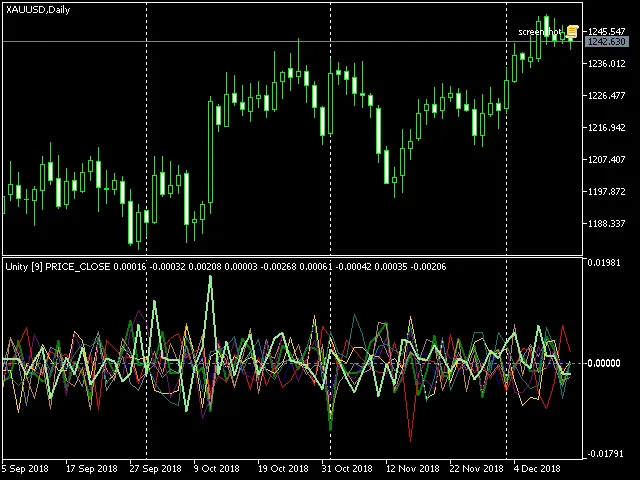
Cluster multi-currency indicator Unity, XAUUSD
The thick lines represent the assets that make up the current chart (in this case, XAU and USD), while the thin lines represent the others.
Here are the main input parameters for the Unity indicator:
- Instruments: A string listing the trading symbols separated by commas; ensure that all instruments share a common currency—either base or quote.
- BarLimit: The number of bars to be calculated.
- Draw: The drawing style.
- PriceType: The price type used in calculations.
- SaveToFile: An optional name for the CSV file where the indicator exports values for external analysis, such as in a neural network. The file structure includes the date in the first column, with subsequent columns representing the corresponding indicator buffer values.
- ShiftLastBuffer: An optional flag to switch the CSV file generation mode. When false, data from the same bar is stored in the file on each line, with the number of columns matching the number of instruments, plus one for dates. If true, an additional column labeled FORECAST is created, containing the values from the last asset column, shifted one bar forward, allowing for forecasting possibilities.
For optimal results, it's recommended to use the Unity indicator on D1 timeframes or higher.




Comments 0