
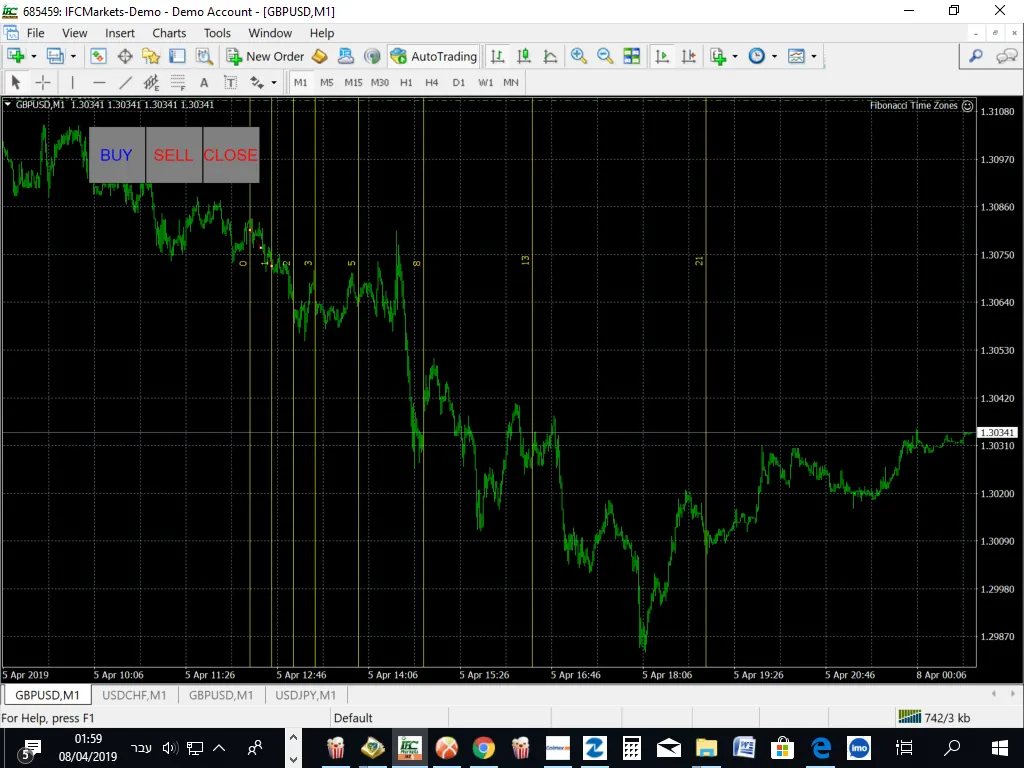
If you're looking to enhance your trading game, the Fibonacci Time Zones EA is a must-have tool for your MetaTrader 4 setup. This handy expert advisor allows you to plot Fibonacci Time Zones directly on your charts, helping you capitalize on price breakouts like a pro!
With its user-friendly interface, this EA features three buttons for manual trading, making it easy to execute your strategies with just a click. Plus, you can set up trailing stop losses and take profits in advance, allowing for seamless trade management. Want to close all your trades at once? No problem!
Here are some tips to get you started:
- Test it on a demo account first. Always play it safe when trying out new tools!
Input Settings:
- Use_TP_In_Money: Enable or disable Take Profit in monetary values (true/false).
- TP_In_Money: Set your Take Profit in money (values: 10-100).
- Use_TP_In_Percent: Enable or disable Take Profit in percentage (true/false).
- TP_In_Percent: Set your Take Profit in percentage (values: 10-100).
- Enable_Trailing: Turn trailing stop loss on or off (true/false).
- Take Profit In Money: Set trailing Take Profit in your current currency (values: 25-200).
- Stop Loss In Money: Set your Stop Loss in your current currency (values: 1-20).
- Exit: Close trades if the trend is against you to manage drawdown (true/false).
- Lots: Set your lot size (values: 0.01-1).
- Maximum Risk: Define your maximum risk in percentage (values: 0.01-10).
- Stop_Loss: Set your Stop Loss (values: 30-500).
- TakeProfit: Set your Take Profit (values: 50-200).
- Magic Number: Unique identifier for your trades (values: 1-100000).
- Number Of Trades: Specify the number of trades (values: 1-100).
- TrailingStop: Set a value from 40 to 100 to activate trailing stop loss; '0' disables it.
- USEMOVETOBREAKEVEN: Activate a no-loss break-even system (values: 0-1).
- When move 'Break Even': Set when to trigger break-even (values: 5-30).
- How much pips move 'Break Even': Define the pip movement for break-even (values: 5-30).
For those looking to dive deeper, check out this guide on how to perform back tests for your strategies.




Comments 0