
If you're looking to get an edge in your trading game, the Exp_BalanceOfPower_Histogram Expert Advisor is worth your attention. This EA uses the BalanceOfPower_Histogram indicator to signal potential trade opportunities based on shifts in market direction.
The magic happens when a bar closes and you see a change in the Moving Average direction—this is your cue to act!
To get started, make sure you have the compiled indicator file BalanceOfPower_Histogram.ex5 in your MetaTrader setup. Just drop it into <terminal_data_folder>\MQL5\Indicators and you’re good to go.
For those of you trading with brokers offering nonzero spreads, the TradeAlgorithms.mqh library file is a game-changer. It allows you to utilize Expert Advisors while setting both Stop Loss and Take Profit right when you open a position. Want more options? You can grab additional variations of the library here: Trade Algorithms.
During the tests below, we used the default input parameters for the Expert Advisor. It's important to note that our tests did not incorporate Stop Loss or Take Profit settings.
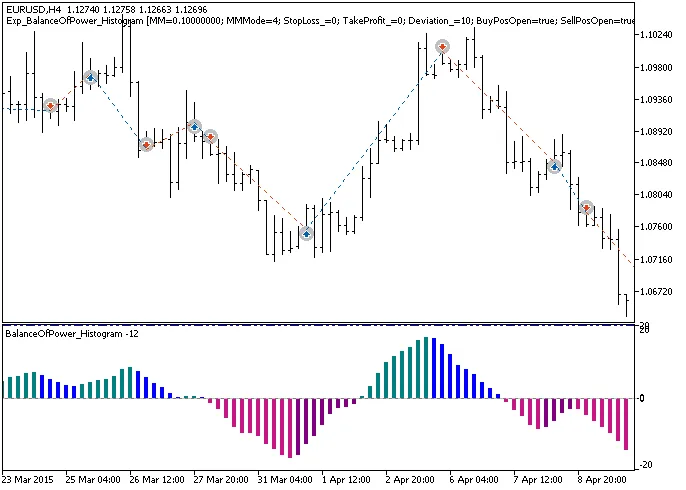
Fig.1. Trading history chart.
Now, let’s dive into the testing results for 2015 using the EURUSD on the H4 timeframe:
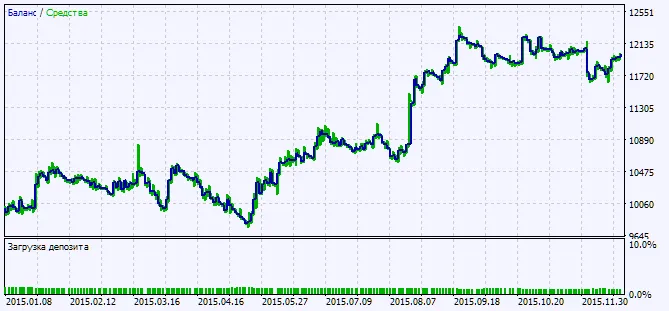
Fig.2. Testing results chart.




Comments 0