
Welcome to the world of automated trading! Today, we're diving into the Exp_HullTrend Expert Advisor, a powerful tool based on the renowned HullTrend indicator.
So, how does it work? The EA generates signals based on the closing of a bar, specifically when there's a shift in the cloud color of the HullTrend indicator. This change can give you a heads-up on potential market movements.
To get the most out of your EA, make sure to place the compiled indicator file HullTrend.ex5 in your terminal_data_folder\MQL5\Indicators directory. Proper setup is key to ensuring smooth operation.
One of the standout features of this EA is its compatibility with brokers offering non-zero spreads, thanks to the TradeAlgorithms.mqh library file. This allows you to set your Stop Loss and Take Profit levels right when you open a position. If you're looking for more options, you can find additional variants of this library here: Trade Algorithms.
In our tests, we've utilized the default input parameters for the Expert Advisor. Notably, neither Stop Loss nor Take Profit was applied during these tests, giving you a clearer view of the EA's performance.
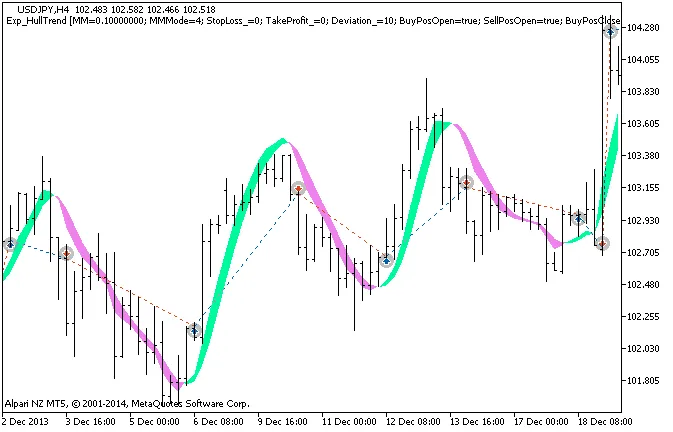
Figure 1: History of deals on the chart.
Let’s take a look at the testing results for the year 2013, specifically on the USDJPY H4 timeframe:
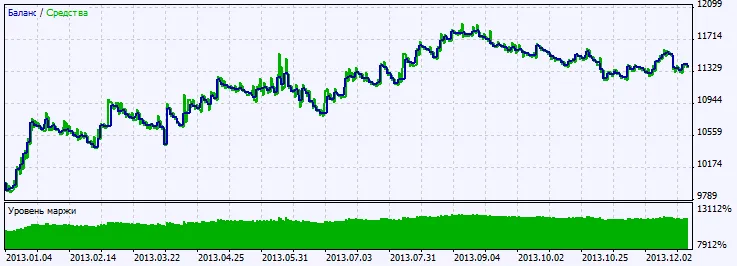
Figure 2: Chart of testing results.




Comments 0