
Hey traders! If you're on the lookout for a robust trend-following system, let me introduce you to the Exp_XROC2_VG_X2. This trading system operates by leveraging signals from two XROC2_VG indicators. The first indicator helps identify the direction of the slow trend using the main and signal lines, while the second one kicks in to signal when to open a trade, particularly when those lines cross or touch.
An entry signal is generated at the close of a bar when these two conditions align:
- Fast and slow trend signals are in agreement;
- Fast trend has reversed direction.
Expert Advisor Inputs:
//+-------------------------------------------------+//| Input parameters of the EA indicator            |//+-------------------------------------------------+inputstring Trade="Trade management";    //+================ TRADE MANAGEMENT ================+inputdouble MM=0.1;               //Share of a deposit in a dealinput MarginMode MMMode=LOT;      //Lot value detection methodinputuint    StopLoss_=1000;      //Stop Loss in pointsinputuint    TakeProfit_=2000;      //Take Profit in pointsinputstring MustTrade="Trade permissions";    //+=============== TRADE PERMISSIONS ===============+inputint    Deviation_=10       //Max price deviation in pointsinputbool   BuyPosOpen=true;     //Permission to enter long positionsinputbool   SellPosOpen=true;    //Permission to enter short positions//+-------------------------------------------------+//| Input parameters of the filter indicator        |//+-------------------------------------------------+inputstring Filter="SLOW TREND PARAMETERS";    //+============== TREND PARAMETERS ==============+inputENUM_TIMEFRAMES TimeFrame=PERIOD_H6;  //1 Chart period for the trendinputuint ROCPeriod1=8;
input Smooth_Method MA_Method1=MODE_JJMA;          //Method of averaging of the first indicatorinputuint Length1=5;                              //The depth of the first smoothing                    inputint Phase1=15;                               //The parameter of the first smoothing,//---- for JJMA within the range of -100 ... +100, it influences the quality of the transition process;//---- for VIDIA it is a CMO period, for AMA it is a slow average periodinputuint ROCPeriod2=14;
input Smooth_Method MA_Method2=MODE_JJMA;          //Method of averaging of the second indicatorinputuint Length2 = 5;                              //The depth of the second smoothing inputint Phase2=15;                               //The parameter of the second smoothing,//---- for JJMA within the range of -100 ... +100, it influences the quality of the transition process;//---- for VIDIA it is a CMO period, for AMA it is a slow average periodinput ENUM_TYPE ROCType=MOM;

inputuint SignalBar=1; //Bar index to receive the entry signalinputbool   BuyPosClose=true;     //Permission to exit long positions by trendinputbool   SellPosClose=true;    //Permission to exit short positions by trend//+-------------------------------------------------+//| Input parameters of the entry indicator         |//+-------------------------------------------------+inputstring Input="ENTRY PARAMETERS";       //+=============== ENTRY PARAMETERS ==============+  inputENUM_TIMEFRAMES TimeFrame_=PERIOD_M30;  //2 Chart period for entryinputuint ROCPeriod1_=8;
input Smooth_Method MA_Method1_=MODE_JJMA;          //Method of averaging of the first indicator inputuint Length1_=5;                              //The depth of the first smoothing                    inputint Phase1_=15;                               //The parameter of the first smoothing,//---- for JJMA within the range of -100 ... +100, it influences the quality of the transition process;//---- for VIDIA it is a CMO period, for AMA it is a slow average periodinputuint ROCPeriod2_=14;
input Smooth_Method MA_Method2_=MODE_JJMA;          //Method of averaging of the second indicator inputuint Length2_ = 5;                            //The depth of the second smoothing inputint Phase2_=15;                               //The parameter of the second smoothing,//---- for JJMA within the range of -100 ... +100, it influences the quality of the transition process;//---- for VIDIA it is a CMO period, for AMA it is a slow average periodinput ENUM_TYPE ROCType_=MOM;

inputuint SignalBar_=1;//Bar index to receive an entry signalinputbool   BuyPosClose_=false;     //Permission to exit long positions by signalinputbool   SellPosClose_=false;    //Permission to exit short positions by signal
The string variables in the code help enhance the visualization of the EA's input parameters. The XROC2_VG_HTF indicators are there to make trend visualization easier within the strategy tester, but they won't be active in other modes.
To get the compiled Expert Advisor working smoothly, don't forget to add the XROC2_VG.ex5 and XROC2_VG_HTF.ex5 indicator files to your <terminal_data_folder>\MQL5\Indicators.
A quick heads-up: the TradeAlgorithms.mqh library file allows you to utilize Expert Advisors with brokers offering nonzero spread and gives you the option to set Stop Loss and Take Profit at the time of position opening. You can grab additional versions of the library at this link: Trade Algorithms.
The default input parameters of the Expert Advisor were used in the tests detailed below. During testing, Stop Loss and Take Profit settings were not applied.
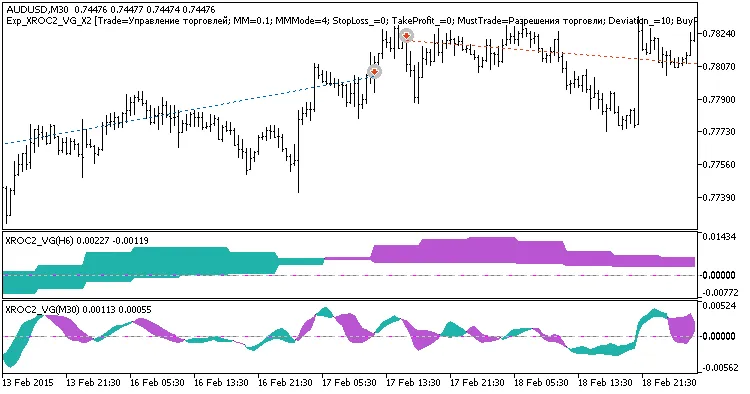
Fig. 1. Examples of deals on the chart
Here are the testing results for 2015 on AUDUSD, utilizing a slow trend on H6, with entries based on the fast trend on M30:
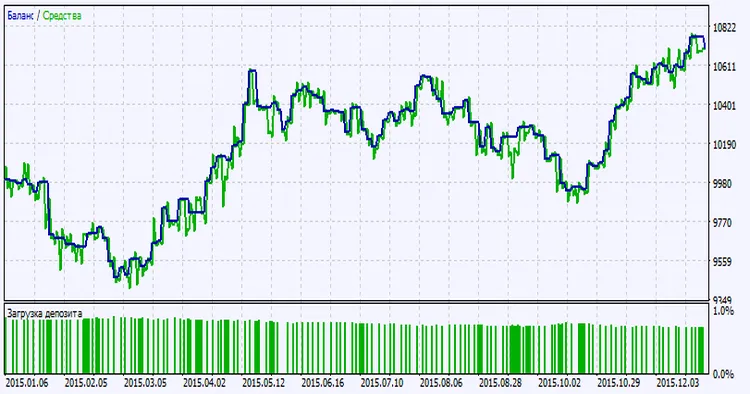
Fig. 2. Testing results chart




Comments 0