
Hey traders! Today, let's dive into the Demarker Martingale EA designed for MetaTrader 4. This expert advisor (EA) is gaining traction for its unique approach to trading, utilizing the 'Demarker' indicator. It’s worth noting that it’s relatively safe as it limits itself to only one trade at a time (just set 'max trades' to 1).
This EA comes packed with features like a Trailing Stop Loss and Take Profit options, making it versatile across all time frames and for major forex pairs and stocks on the NASDAQ.
- Martingale Strategy: If a trade results in a loss, the EA automatically opens a new position with a multiplied lot size. It employs a smart formula to calculate the lot size based on previous trades.
- Demo First: Always test your strategies on a demo account before going live.
- Open Candle Trades: This EA only trades based on the price of the open candle.
- Volume Control: The trade volume is adjusted based on past trading outcomes.
- Risk Management: You can set limits for the maximum risk as a percentage of your deposit.
- Constant Lot Size: If you prefer to trade a fixed lot size (like 0.01 lots), set 'MaximumRisk = 0' and 'DecreaseFactor = 0'.
- Risk-Based Trading: Otherwise, the EA will calculate the lot size based on a percentage of your deposit and your set maximum risk.
Key Inputs:
- Use_TP_In_Money: Set to true or false to enable Take Profit in monetary terms.
- TP_In_Money: Define your Take Profit in money (values: 10-100).
- Use_TP_In_Percent: Enable or disable Take Profit in percentage.
- TP_In_Percent: Set your Take Profit in percentage (values: 10-100).
- Enable_Trailing: Activate trailing stop with true or false.
- Take Profit In Money: Set in current currency (values: 25-200).
- Stop Loss In Money: Define your stop loss in current currency (values: 1-20).
- Exit: Close trades if the trend reverses to manage drawdown.
- Multiply: Set how much to multiply for the Martingale strategy (values: 1-4).
- Lots: Choose your lot size (values: 0.01-1).
- Double_Lotsize: Set to true if you want to double your lot size.
- Lot_Size_Increment: Additional orders will increase by this amount.
- Stop_Loss: Define the stop loss in pips.
- Take_Profit: Define the take profit in pips.
- Period: Set the Demarker period (values: 1-50).
- MagicNumber: Specify a magic number for your EA (values: 1-100000).
- Time Settings: Define start and end hours (values: 0-24).
- Maximum_loss: Set the maximum allowed loss (values: 1-500).
- WaitTime: Define wait time for loss in minutes (values: 1-360).
- Max_Trades: Set maximum trades (values: 1-10).
- TrailingStop: Activate trailing stop loss between 40 to 100, or set it to 0 to disable.
- Enable Break Even: Set to true or false.
- Break Even Move: How much to move to break even (values: 5-30).
- Pips Move: How many pips to move to break even (values: 5-30).
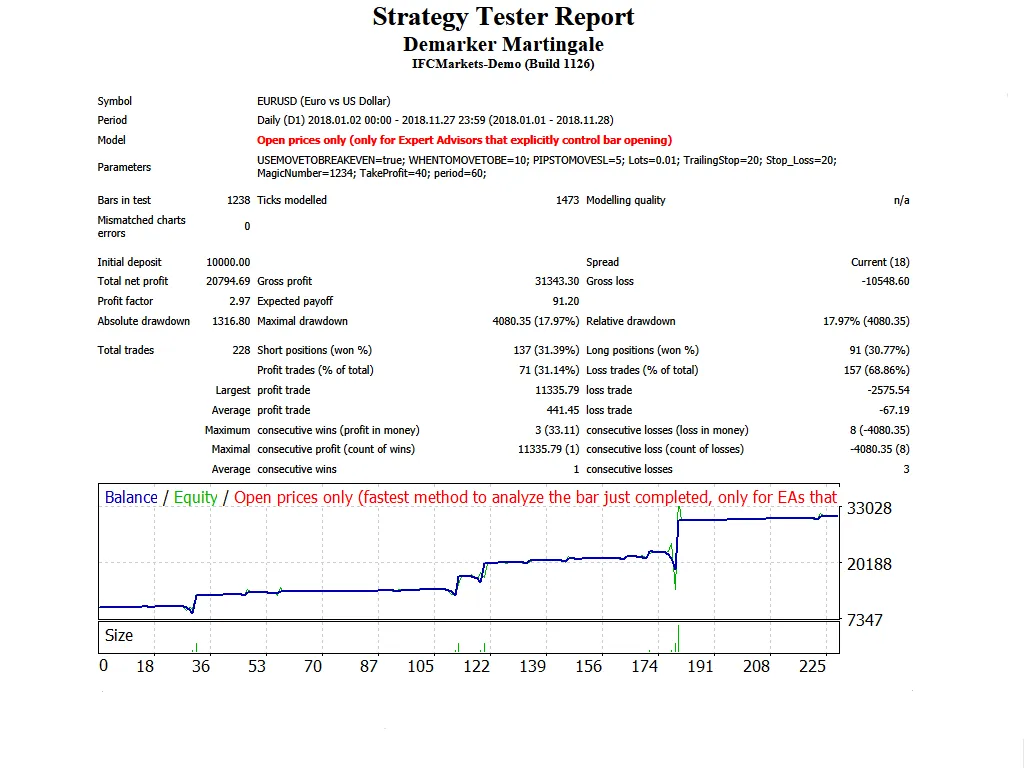
Remember, it's crucial to optimize this EA every few months using the same inputs mentioned above.
Curious about backtesting? Check out this link for a step-by-step guide.




Comments 0