
Welcome to the Graphic Panel Contest Submission!
Source Code:
You'll find the source code and presentation attached as a ZIP file.
Helpful Hints:
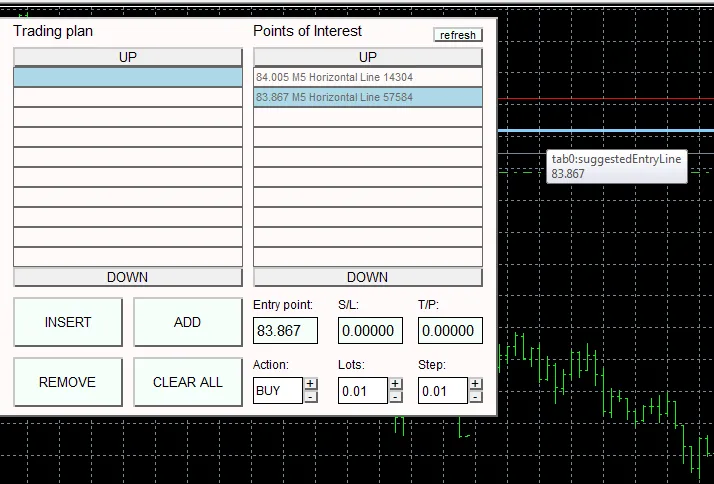
1) Setting your take profit (TP) and stop loss (SL) levels is a breeze! Just drag the BLUE line (suggestedEntryLine) to your desired level. The TP and SL will automatically adjust based on your chosen action (BUY or SELL) and will populate the S/L and T/P fields. If you need to make changes, simply drag the blue line again or enter new values directly into the S/L or T/P fields (double-click to edit and hit Enter to confirm).
2) The MTF indicator module draws its values from timeframes M1 to MN1. If you notice that not all rectangles display indicator values after running this module on a fresh MT5 installation, don't worry! This is perfectly normal as the terminal needs to download historical data first. Once all the history is in, the module will display all values correctly, and the indicator values will be updated tick by tick. This can provide insights into the market's 'mood.'
3) Your Points of Interest list will be generated from:
- Any horizontal lines;
- Any Fibonacci retracement levels;
- Any PIVOT points (set by the PIVOT module).
If you add any extra lines while the Trade Plan is open, just hit the 'Refresh' button to update the list with your new objects.
4) The Fibonacci calculator remembers lines across different timeframes, making it easy to switch between them and select which pivot to display. The calculator is based on a web tool available at www.mypivots.com/calculators/pivot-point-calculator.aspx.
5) Be sure to check out the videos in the Demos section to see the panel’s main features in action.
Demos:
Here are some embedded videos for your convenience:
1.
2.
3.
4.
5.
Cheers,
The Investeo Team




Comments 0