
If you're diving into the world of trading, you'll want to get acquainted with the JFatl Digit System. This trading system relies on indicator signals that help you make informed decisions. Essentially, a signal is triggered when a bar closes, and this happens if there's a colored bar followed by a bar of the opposite color, or if the previous bar is colorless.
To get this Expert Advisor (EA) up and running, you'll need the compiled indicator file, JFatl_Digit_System.ex5. Make sure to place this file in your <terminal_data_folder>\\MQL5\Indicators directory for it to work properly.
One cool feature of this EA is its compatibility with brokers offering nonzero spreads. Plus, it allows you to set your Stop Loss and Take Profit levels right when you open a position. If you're looking for more options, you can download additional versions of the TradeAlgorithms.mqh library here: Trade Algorithms.
The default input parameters of the EA were used during the tests shown below, and it's worth noting that neither Stop Loss nor Take Profit settings were applied during these tests.
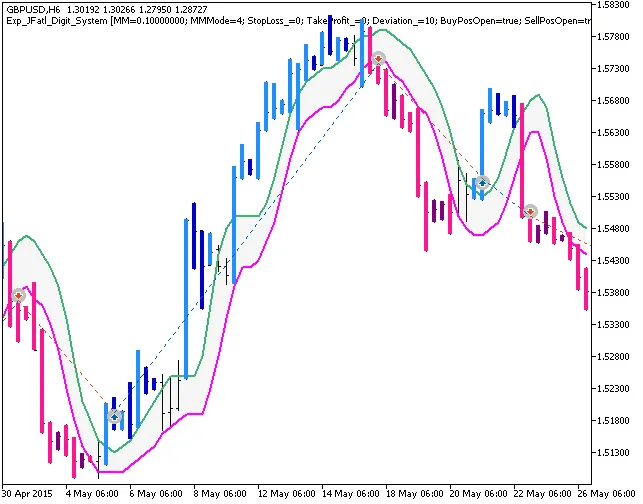
Fig. 1. The instances of history of deals on the chart.
Now, let’s take a look at the testing outcomes for GBPUSD on an H6 timeframe from 2015:
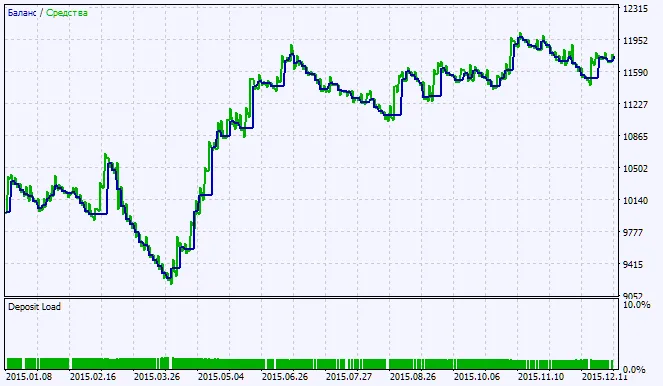
Fig. 2. Testing results chart




Comments 0