
Get to Know TimeZones Six v2
TimeZones Six v2 is a fantastic tool for traders who want to keep track of different time zones directly on their charts. Let’s break down what this indicator can do for you:
- Position the indicator anywhere on your chart for maximum visibility.
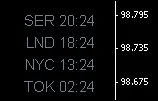
- The SER (Server Time) shows your broker's server time, which you can't change.
- You can customize the remaining five time zones to suit your needs.
- Both the SER label and the labels for the other time zones are customizable.
- If there are time zones you don’t need, you can simply hide them.
- In the demo image above, LND (London) has an offset of -2, while NYC (New York City) shows an offset of -7.
- If you decide to hide certain time zones, you may need to adjust the Up_Down parameter to a negative value to position the indicator closer to the bottom of your chart.
- By default, two time zones are hidden. If you choose to display them, remember to adjust the Up_Down parameter from -20 to a positive value to lift the indicator off the lower chart margin.
- For those who prefer a bolder look, set Fonts_Bold to true for a more striking display.




Comments 0