
Hey fellow traders! Today, we're diving into the Elder's Safe Zone indicator, specifically its multi-timeframe (MTF) version designed for MetaTrader 5. This tool is essential for anyone looking to enhance their trading strategy by calculating safe zones across three different timeframes.
So, what exactly does the Elder's Safe Zone do? Simply put, it calculates a minimum stop loss to ensure that you’re protected from sudden price movements without being too tight and risking unnecessary stop-outs. This way, you can lock in your profits while still giving your trades some breathing room.
Let’s break down the seven key input parameters that you’ll need to configure:
- ESZ Period - This is the period used for the safe zone calculations.
- Stop Factor - Determines how far the safe zone line is shifted from the current price.
- EMA Period - The period for calculating the Exponential Moving Average (EMA) to help define the price direction.
- Drawing Mode - Choose how you want the safe zones to be displayed:
- Steps - Displays lines in steps.
- Slope - Connects values of neighboring bars across the specified timeframes with inclined lines.
- First ESZ Timeframe - Select the timeframe for the first presented Elder's Safe Zone.
- Second ESZ Timeframe - Choose the timeframe for the second safe zone.
- Third ESZ Timeframe - Set the timeframe for the third safe zone.
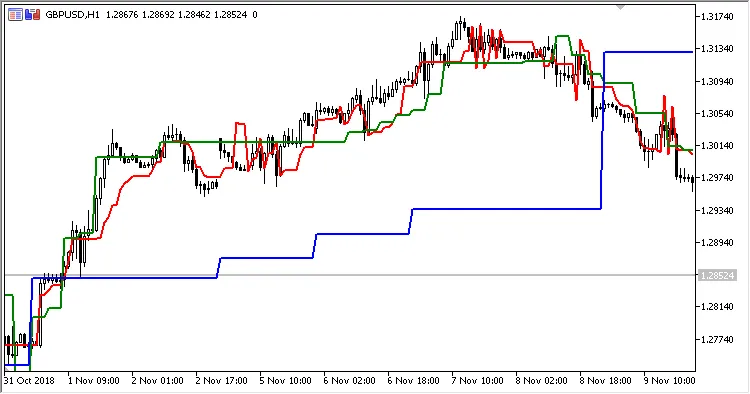
Fig.1. Multi-timeframe Elder's Safe Zone in Steps Mode
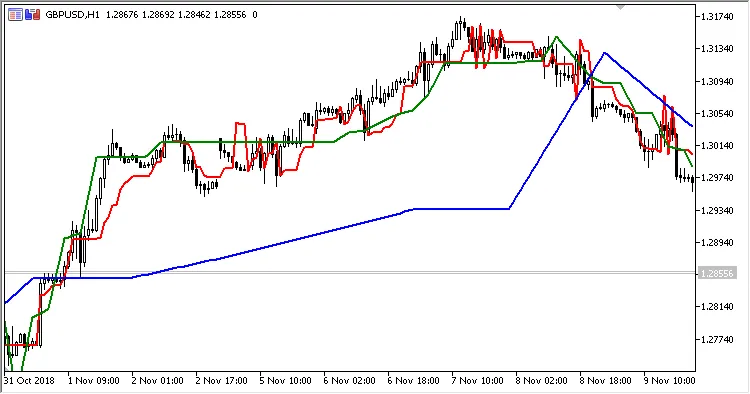
Fig.2. Multi-timeframe Elder's Safe Zone in Slope Mode
In summary, the Elder's Safe Zone MTF indicator is a powerful ally for traders looking to manage risk effectively while navigating the market. Make sure to experiment with the parameters to find what suits your trading style best. Happy trading!




Comments 0