
Description
If you're looking to enhance your trading strategy, the CTEMAOnRingBuffer class is a game changer for calculating the Triple Exponential Moving Average (TEMA) using a ring buffer algorithm. This lightweight solution for MetaTrader 5 will help you streamline your trading decisions.
Declaration
class CTEMAOnRingBuffer : public CArrayRing
Title
#include <IncOnRingBuffer\CTEMAnRingBuffer.mqh>To get started, you’ll need to place the CTEMAOnRingBuffer.mqh file in the IncOnRingBuffer folder within your MQL5\Include directory. You’ll also find two example files included to guide you through the process. Don’t forget to add the necessary files for the ring buffer, DEMA, and standard Moving Average to this folder as well.
Class Methods
//--- initialization method:
bool Init( // returns false on error, true on success
   int period = 12, // TEMA period
   ENUM_MA_METHOD method = MODE_EMA, // smoothing method
   int size_buffer = 256, // ring buffer size
   bool as_series = false // true for time series, false otherwise
);
//--- calculation method based on a time series or indicator buffers:
int MainOnArray( // returns the number of processed elements
   const int rates_total, // size of the array
   const int prev_calculated, // processed elements from the previous call
   const double& price[], // array for calculation
);
//--- calculation method for a specific element in the array:
double MainOnValue( // returns TEMA value for a specific element (bar)
   const int rates_total, // size of the array
   const int prev_calculated, // processed elements of the array
   const int begin, // start of significant data in the array
   const double value, // value of the element (bar)
   const int index // index of the element (bar)
);
//--- methods for data access:
int BarsRequired(); // returns necessary bars to draw the indicator
string Name(); // returns the name of the indicator
int Period(); // returns the period
int Size(); // returns the size of the ring buffer
double MA(int index); // returns Moving Average value, indexed like a time series
double DEMA(int index); // returns DEMA value, indexed like a time series
Accessing the calculated indicator data from the ring buffer is just like accessing a standard array. Here’s how you can implement that:
//--- class with TEMA calculation methods:
#include <IncOnRingBuffer\CTEMAOnRingBuffer.mqh>
CTEMAOnRingBuffer tema;

...

//+------------------------------------------------------------------+
//| Custom indicator iteration function |
//+------------------------------------------------------------------+
int OnCalculate (const int rates_total, // size of the price[] array
      const int prev_calculated, // processed bars on the previous call
      const int begin, // start of significant data
      const double& price[]) // array for calculation
  {
//--- calculate indicator based on time series:
    tema.MainOnArray(rates_total, prev_calculated, price);

...

//--- use data from the "tema" ring buffer,
// for example, copy data into the indicator buffer:
    for(int i=start; i<rates_total && !IsStopped(); i++)
      TEMA_Buffer[i] = tema[rates_total - 1 - i]; // TEMA indicator line

...

//--- return value of prev_calculated for next call:
    return(rates_total);
  }
When you calculate the TEMA, the Moving Average and DEMA are also computed with the same parameters. You can access the data from the MA ring buffer and DEMA using the MA() and DEMA() methods respectively:
//--- use data from Moving Average and DEMA ring buffers,
// for example, copy them into indicator buffers:
  for(int i=start; i<rates_total && !IsStopped(); i++)
     {
      MA_Buffer[i] = dema.MA(rates_total - 1 - i); // Moving Average indicator line
      DEMA_Buffer[i] = dema.DEMA(rates_total - 1 - i); // DEMA indicator line
    }
Keep in mind that indexing in the ring buffers works just like in the time series.
Examples
- The Test_TEMA_OnArrayRB.mq5 file showcases the indicator based on the price time series, demonstrating the use of the MainOnArray() method.
- The Test_TEMA_OnValueRB.mq5 file illustrates the MainOnValue() method; first calculating and drawing the TEMA indicator, then drawing another TEMA based on the initial indicator's ring buffer.
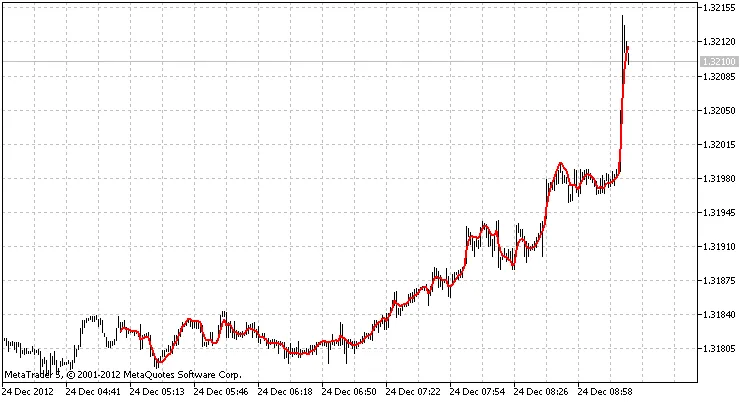
Output from Test_TEMA_OnArrayRB.mq5 with a ring buffer size of 256 elements
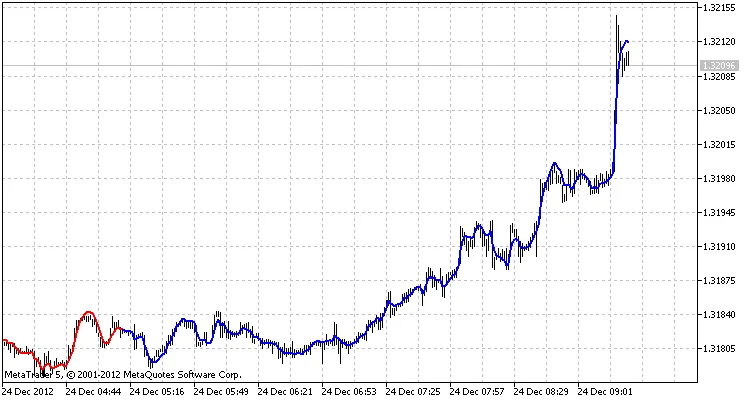
Output from Test_TEMA_OnValueRB.mq5 with a ring buffer size of 256 elements
Development for this code draws on the expertise of MetaQuotes Software Corp., Integer, and GODZILLA.




Comments 0