
Open Position v3a Update
Open Position v2 has officially been upgraded to Open Position v3a for MT4 Build 600. Here’s everything you need to know to make the switch smoothly!
Update Steps
- First things first, remove all old instances of Open Position v2 from your charts.
- Delete all files related to Open Position v2 from the Experts/Indicators folder. Make sure there are no leftovers in your MQL4/Indicators folder as well.
- Now, install Open Position v3a in the MQL4/Indicators folder.
This indicator is a modification of the MetaQuotes iExposure indicator, designed to enhance your trading experience.
Features of Open Position v3a
- It locks itself to the top right corner of a secondary window.
- The indicator opens as a secondary window right below the main chart.
- Feel free to drag it onto any secondary window, like Stochastic or MACD, for added convenience.
- If it doesn’t open as a secondary window (which is rare), simply install Blank.mq4 and then drag the indicator onto it.
- The indicator will only display when you have one or more positions open.
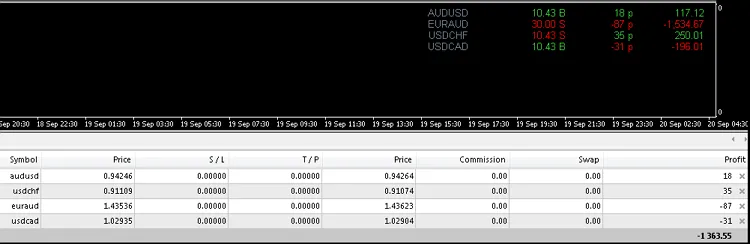
- Remember, MT4 calculates in points, not pips. Compare the point numbers in the demo image with the values under the Profit heading in your terminal.
- Use Column_Spacer to adjust the spacing between columns. Be careful with larger increments, as they might push the indicator out of view. Decimal increments offer finer control.
- If you want bold fonts, set Fonts_Bold: true.
If you notice discrepancies between your MT4 terminal numbers and the installed indicator, here’s how to fix it:
- Open your Terminal (Ctrl+T).
- Right-click on the Profit heading and shift your cursor to the Profit menu. Select as Points.
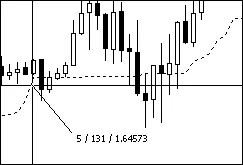
For precision, focus on the chart and use the crosshairs (Ctrl+F) or the mouse scroll wheel. Hold down the left mouse button and drag at a 45-degree angle. In the image below, you’ll see the bar displacement and price displacement in Points.
Calculating the Value of a Move: To quickly calculate the point value, use the formula from the image. For instance, with AUDUSD (117.12/(10.43 x 18)) = (117.12/187.74) = 0.62384. Round it to £0.62 for simplicity, but keep five decimal places for accuracy. So, an 18-point move at 10.43 lots equals 117.12, and a 180-point move (18 x 10) at the same lot size equals 1,171.20. You can confirm this using the point value: 10.43 x 180 x 0.62384 = 1,171.20.
The image illustrates trades taken to verify the following scenarios:
- A Buy profit
- A Buy loss
- A Sell profit
- A Sell loss
Tick Generator: If your indicator update lags behind in a fast market or on slower PCs, consider using a tick generator to keep everything current. You can find a free tick generator here. Although it's designed for EAs, it’s great for keeping indicators updated as well.




Comments 0