
Lorsque l'indicateur standard iStochastic est appelé depuis un EA, deux niveaux, 80,0 et 20,0, seront TOUJOURS affichés dans le Visual Tester. Cela peut poser problème si votre EA utilise d'autres niveaux, comme 75,0 et 25,0.
C'est pourquoi l'indicateur standard a été amélioré : l'indicateur Stochastic Custom propose deux nouveaux paramètres :
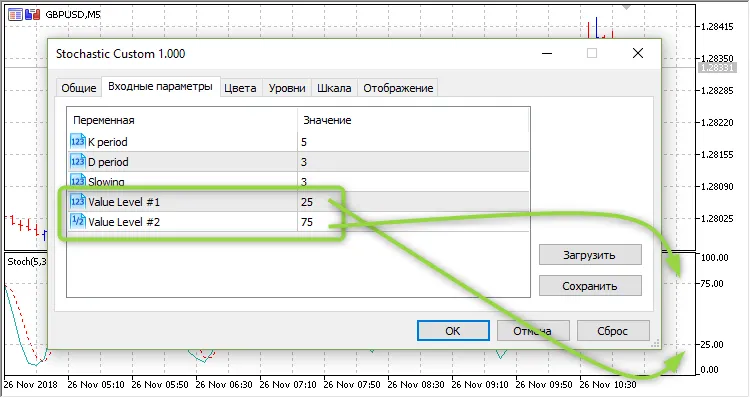
Voici un exemple d'appel de l'indicateur depuis un EA :
***
inputint            Inp_STO_KPeriod= 5;        // STO : Période Kinputint            Inp_STO_DPeriod= 3;        // STO : Période Dinputint            Inp_STO_Slowing= 3;        // STO : Lissageinputint            Inp_STO_Level1 = 25.0;     // STO : Niveau Valeur #1inputdouble         Inp_STO_Level2 = 75.0;     // STO : Niveau Valeur #2
***
//--- créer le handle de l'indicateur iCustom
   handle_iStochastic=iCustom(m_symbol.Name(),Period(),"Stochastic Custom",
                              Inp_STO_KPeriod,Inp_STO_DPeriod,Inp_STO_Slowing,Inp_STO_Level1,Inp_STO_Level2);
//--- si le handle n'est pas créé
   if(handle_iStochastic==INVALID_HANDLE)
     {
      //--- indiquer l'échec et afficher le code d'erreur
      PrintFormat("Échec de la création du handle de l'indicateur iCustom pour le symbole %s/%s, code d'erreur %d",
                  m_symbol.Name(),
                  EnumToString(Period()),
                  GetLastError());
      //--- l'indicateur est arrêté prématurément
      return(INIT_FAILED);
     }




Commentaire 0