
Author:
maj1es2tic (Tim Welch)
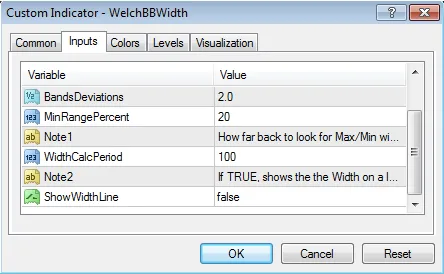
This indicator measures the current Width of the Bollinger Bands and compares it to the Maximum and Minimum Width over a specified number of periods (WidthCalcPeriod).
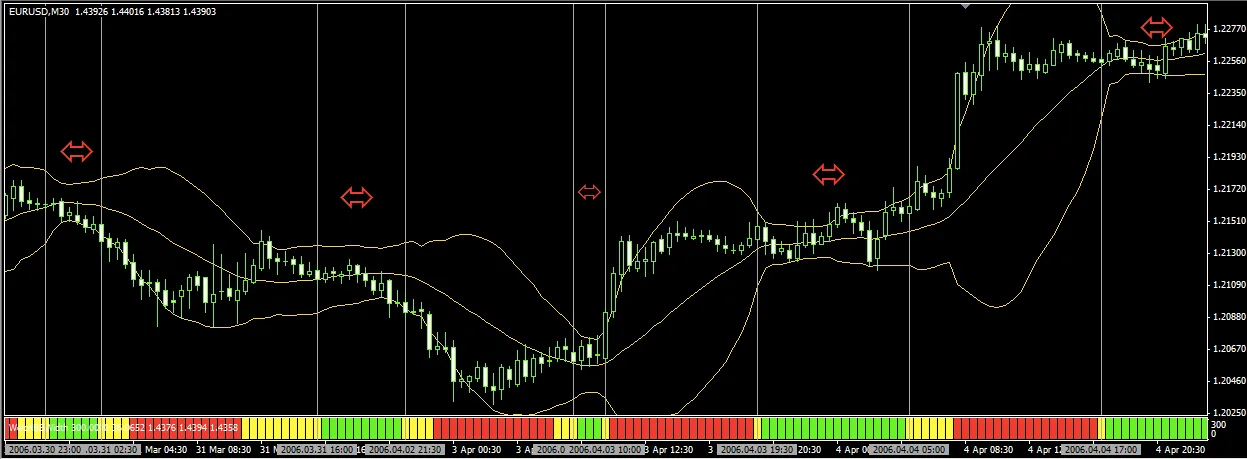
If the calculated percentage is less than or equal to MinRangePercent, the histogram displays Green. If it's double the MinRangePercent, the histogram turns Yellow. If none of these conditions are met, the histogram shows Red.
This feature is handy for quickly determining whether a currency pair is in a range or on the verge of breaking out. If you enable ShowWidthLine, a line representing the actual width of the Bollinger Bands in PIPS will also be displayed. This indicator is compatible with both 4 and 5 digit brokers and works across all currency pairs.
Using iCustom to extract values for a Trading System or other Custom Indicators:
You can easily extract any of the values externally using the following code:
int period=0; // how far back do you want to look? 0 == current bar, 1 == previous bar, etc.double WelchBBWidth_Green = iCustom(NULL, 0, "WelchBBWidth", 20, 0, 2.0, 20, "x", 100, "x", false, 0, period);
double WelchBBWidth_Yellow = iCustom(NULL, 0, "WelchBBWidth", 20, 0, 2.0, 20, "x", 100, "x", false, 1, period);
double WelchBBWidth_Red = iCustom(NULL, 0, "WelchBBWidth", 20, 0, 2.0, 20, "x", 100, "x", false, 2, period);
// This gives you the actual width in PIPs of the Bollinger Bandsdouble WelchBBWidth = iCustom(NULL, 0, "WelchBBWidth", 20, 0, 2.0, 20, "x", 100, "x", false, 3, period);
// These will give you the actual Bollinger Band Line values.double WelchBBWidth_MiddleLine = iCustom(NULL, 0, "WelchBBWidth", 20, 0, 2.0, 20, "x", 100, "x", false, 4, period);
double WelchBBWidth_UpperLine = iCustom(NULL, 0, "WelchBBWidth", 20, 0, 2.0, 20, "x", 100, "x", false, 5, period);
double WelchBBWidth_LowerLine = iCustom(NULL, 0, "WelchBBWidth", 20, 0, 2.0, 20, "x", 100, "x", false, 6, period);
You could incorporate something like this in your Trading System:
/*
* int areWeRanging(int period=0)
*
* Returns 1 for GREEN (ranging)
* Returns -1 for YELLOW (start/end of range)
* Returns 0 otherwise (no range)
*/int areWeRanging(int period=0)
{
 double WelchBBWidth_Green = iCustom(NULL, 0, "WelchBBWidth", 20, 0, 2.0, 20, "x", 100, "x", false, 0, period);
 double WelchBBWidth_Yellow = iCustom(NULL, 0, "WelchBBWidth", 20, 0, 2.0, 20, "x", 100, "x", false, 1, period);

 if ( WelchBBWidth_Green > 0 )
 {
   return (1);
 }
 elseif ( WelchBBWidth_Yellow > 0)
 {
   return (-1);
 }

 return (0);
}

// Check to see if we are coming out of a range.// This tells us that the LAST candle was still in a range,
// but the current candle is now breaking free of the range.if ( areWeRanging(1)==1 && (areWeRanging(01 || areWeRanging(00) )
 {
  Print("We were ranging, but have now broken out of the range! Make a trade if other indicators confirm the breakout!");
 }
** Use any/all code at your own discretion, and ensure you have confirmation from other indicators before placing real trades. **
Image:
*NOTE: The dark grey vertical lines and red arrows are for illustration purposes only and will not appear on your chart.
Enjoy!
-Tim




Comments 0