
Hey fellow traders! Today, let’s dive into the Exp_XKRI_Histogram Expert Advisor (EA) for MetaTrader 5. This nifty tool is designed around the XKRI_Histogram oscillator, which signals potential trading opportunities when it detects a change in direction as the bar closes.
To get started with this EA, you'll need to have the compiled indicator file XKRI_Histogram.ex5 installed. Just drop it into your <terminal_data_folder>\MQL5\Indicators directory, and you're good to go!
One thing to keep in mind: the TradeAlgorithms.mqh library enables you to use Expert Advisors with brokers that offer nonzero spreads. Plus, it gives you the flexibility to set Stop Loss and Take Profit right when you open a position. If you're interested in exploring more options, you can find additional variants of the library here: Trade Algorithms.
For the tests I’ve conducted, I used the default input parameters for the EA. Notably, I didn’t employ Stop Loss and Take Profit during these tests, so keep that in mind when interpreting the results.
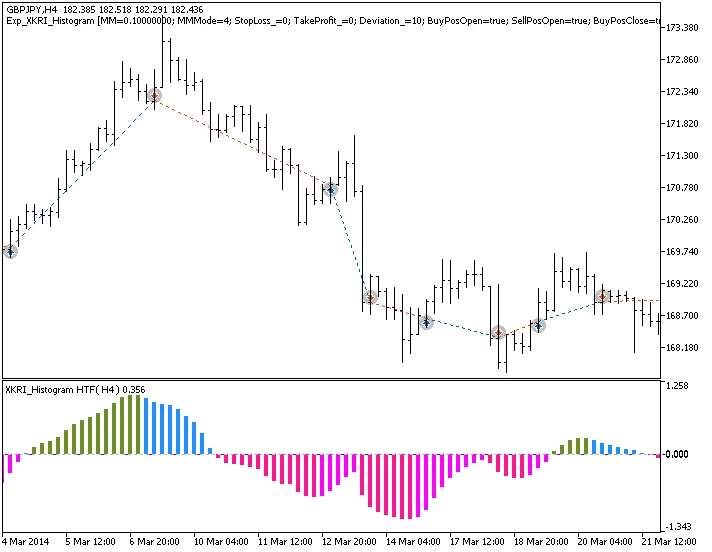
Fig.1. Examples of deals on the chart
Here are the testing results from 2014 using GBPJPY on the H4 timeframe:
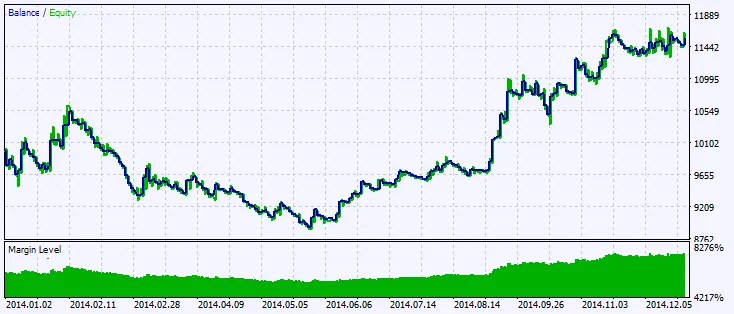
Fig.2. Testing results chart




Comments 0