
Description:
Let's dive into the latest features of the TrailingStopFrCnSAR script for MetaTrader 4!
- This script introduces a trailing function that adjusts based on your portfolio's profits. You can set Stop Levels once your total orders hit breakeven in the desired direction.
- Run the script in a single window with SymbolAll set to true, allowing it to manage orders for all symbols effortlessly.
- We've added the ability to define trailing lengths based on both the Parabolic and Velocity indicators.
The script operates as either a standalone script or as an Expert Advisor. Depending on the TrailingStop variable you choose, it can trail positions using Fractals (placing stop levels at the nearest fractal adjusted by a delta), extreme values from previous bars (like placing stops at Low minus delta for Buy orders), or the Parabolic and Velocity indicators based on a specified number of points.
- TrailingStop = 1; // Options: "0-off, 1-Candle, 2-Fractals, 3-Velocity, 4-Parabolic, >4-pips";
- delta = 0; // Shift from a fractal, candlestick, or Parabolic
- only_Profit = true; // Apply trailing only to profitable orders
- only_NoLoss = false; // Shift to breakeven instead of trailing
- only_SL = false; // Only trail orders that have a Stop Loss
- SymbolAll = true; // Apply trailing to all instruments
- Portfel = true; // Base trailing on portfolio profit
Additional parameters:
If you set TrailingStop = 4, the script will use the Parabolic indicator to determine the stop level distance:
- Step = 0.02;
- Maximum = 0.2;
- Magic = 0;
If TrailingStop = 4, the Velocity indicator will be utilized as well:
- VelocityPeriodBar = 30; // This is the parameter for the Velocity indicator, indicating the rate of price change
- K_Velocity = 1.0; // Stop Loss multiplier based on Velocity
Visualization:
You'll see real-time updates about the script's operation on your screen, including:
- Configuration settings
- Number of orders being managed by the script
- Minimum allowable stop levels (-)
- Current potential stop levels (displayed as price labels)
- Current breakeven levels (also shown as price labels)
Example:
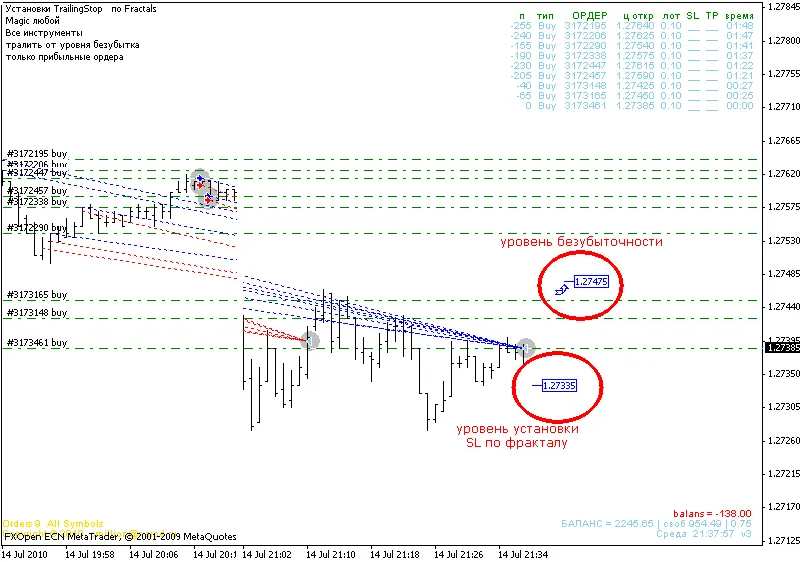
In the screenshot, you can see how the trailing stop is set based on portfolio profit levels, calculated using fractals. Once the stop loss setting (the lower price label) climbs above the breakeven level (the upper price label), the script will start securing stops for all orders, regardless of their current profit status. Even if these stop levels close out all orders, your total profit remains in the green!
Recommendations:
The script will automatically shut down after all orders are closed.
Moreover, this script can operate without the Velocity indicator. Feel free to utilize any other indicator that measures velocity (the rate of price change).




Comments 0