
Hey fellow traders! Today, let’s delve into an exciting trading system that leverages the BlauSMStochastic oscillator. This tool can be a game changer in your trading strategy.
So, how does it work? A trading decision is typically triggered when the histogram shifts direction, crosses the zero line, or when the signal line cloud changes color. The following input parameter is key for selecting your entry algorithm:
input AlgMode Mode=twist; //the algorithm for entering the market
To ensure your EA runs smoothly, make sure to place the compiled indicator file, BlauSMStochastic.ex5, in the terminal_data_folder/MQL5/Indicators directory.
It’s important to note that the TradeAlgorithms.mqh library file enables the use of Expert Advisors with brokers that offer a non-zero spread. Plus, it allows you to set Stop Loss and Take Profit when opening a position. If you need other versions of this library, you can find them here.
For the tests detailed below, we used the default input parameters of the Expert Advisor, and neither Stop Loss nor Take Profit were applied during the testing phase.
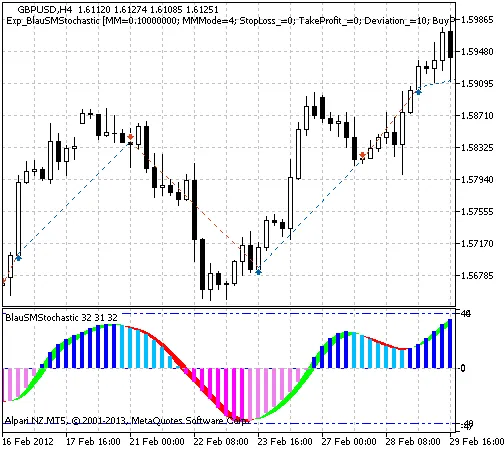
Fig. 1 The instances of history of deals on the chart.
Now, let’s take a look at the testing results for GBPUSD on the H4 timeframe during 2012-2013:
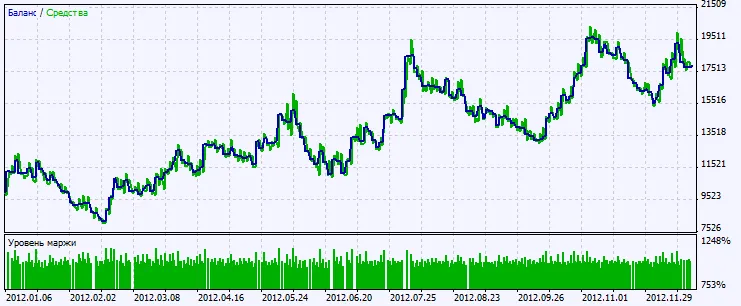
Fig. 2. Chart of testing results




Comments 0