
If you're looking to amplify your trading game, the Exp_Force_DiverSign Expert Advisor (EA) could be your new best friend! This nifty tool is built on signals generated by the Force_DiverSign semaphore signal indicator, designed to help you make informed trading decisions.
So, how does it work? A trading signal is created when a bar closes and a new colored indicator spot pops up. It’s as straightforward as that! Just keep an eye on those indicator changes to catch the right trading opportunities.
To get started, you’ll need the Force_DiverSign.ex5 compiled indicator file. Make sure to place it in your <terminal_data_folder>\MQL5\Indicators directory. Once you have that set up, you’re ready to roll!
One key feature to note is that the TradeAlgorithms.mqh library file allows you to use EAs with brokers offering nonzero spreads. It also gives you the option to set your Stop Loss and Take Profit right when you open a position. If you're interested in exploring more variants of this library, check out the link here: Trade Algorithms.
In our tests, we utilized the default input parameters for the Expert Advisor. It’s important to mention that we did not apply Stop Loss or Take Profit during these tests, so keep that in mind as you evaluate the results.
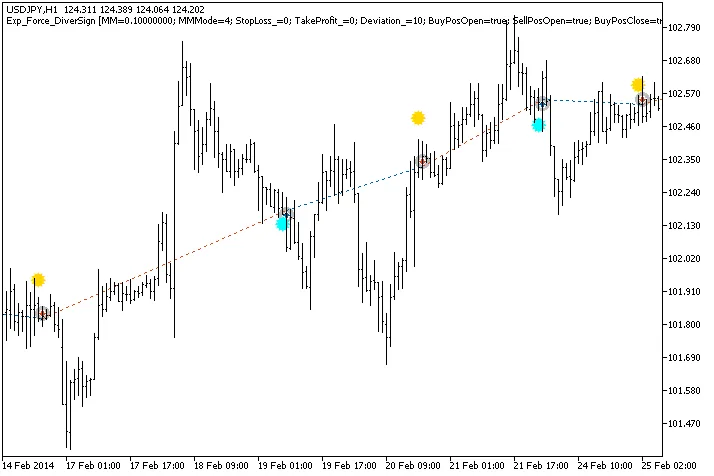
Fig.1. Trade examples on the chart
Let’s take a look at the testing results for 2014 on the USDJPY H1 chart:
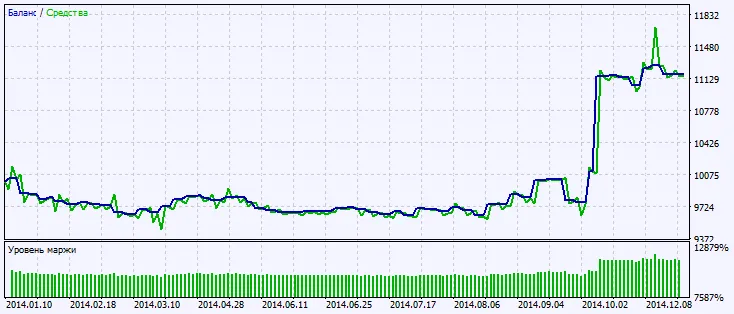
Fig.2. Testing results chart




Comments 0