
Hey there, fellow traders! Today, we're diving into an excellent trading system that leverages the signals from the PriceChannel_Stop indicator. This system generates signals at the close of a bar whenever a color point that indicates a trend change pops up.
To get started, you’ll need the compiled indicator file, PriceChannel_Stop.ex5. Make sure to save it in your <terminal_data_folder>\MQL5\Indicators directory to ensure smooth operation.
A quick heads-up: the TradeAlgorithms.mqh library file lets you run Expert Advisors with brokers that offer a nonzero spread and allows you to set your Stop Loss and Take Profit levels right when you open a position. If you’re interested, you can grab more variations of this library from this link: Trade Algorithms.
In the tests below, we used the default input parameters for the Expert Advisor. Just to note, we didn’t apply Stop Loss or Take Profit during these tests.
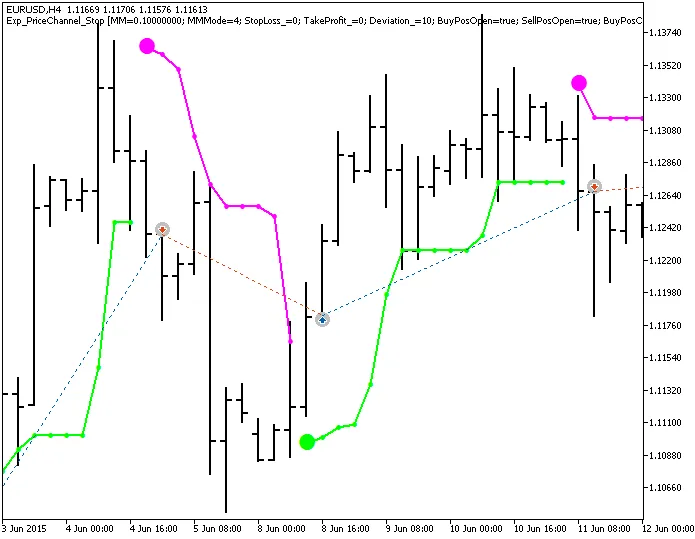
Fig. 1. Examples of trades on the chart
Now, let’s take a look at the testing results for 2015 using the EURUSD on the H4 timeframe:
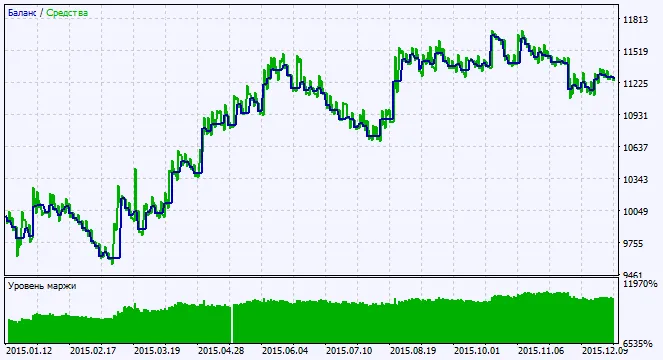
Fig. 2. Chart of testing results




Comments 0