
Hey traders! Today, I want to introduce you to a fantastic trading tool known as the Divergence Trader, developed by Ron Thompson. This Expert Advisor (EA) is a revamped version from MQL4 and was originally shared by Collector on MQL5.
How It Works
This EA uses two simple moving averages based on opening prices. It calculates values from the current and previous bars and essentially finds the difference between the fast and slow moving averages from the last bar. When the difference crosses a certain level, it indicates a buy signal, and the opposite applies for a sell signal.
Plus, you can set a trailing stop and breakeven for any open positions, which is a great way to lock in profits as the market moves in your favor!
Another nifty feature of this EA is its ability to close all open positions once you've hit a specific profit or loss threshold. This can be super handy if you're using multiple EAs in the same trading account.
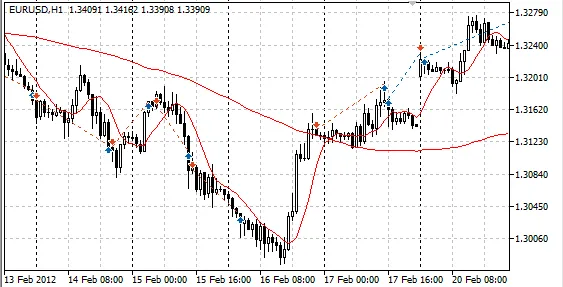
Check out the image below to see how the Divergence Trader performs in the strategy tester's visual mode:
Key Parameters
- Lots: Position volume.
- MultyOpen: Allows you to add volume to an existing position.
- MaxVolume: Sets the maximum position volume if MultyOpen is enabled.
- StopLoss: Stop Loss in points.
- TakeProfit: Take Profit in points.
- Trailing: Trailing stop level (set to 0 to disable).
- BreakEven: The profit level in points to move your Stop Loss to breakeven (set to 0 to disable).
- Fast_Period: Fast moving average period.
- Fast_Price: Price type for the fast MA.
- Slow_Period: Slow moving average period.
- Slow_Price: Price type for the slow MA.
- DVBuySell: Minimum divergence level for Buy signals (for Sell, it's -DVBuySell).
- DVStayOut: Minimum divergence level for Sell signals (for Buy, it's -DVStayOut).
- BasketProfitON: Enables closing all positions when a certain profit level is reached.
- BasketProfit: Profit level at which all account positions will close (for all symbols).
- BasketLossON: Enables closing all positions when a certain loss level is reached.
- BasketLoss: Loss level at which all account positions will close (for all symbols).




Comments 0