
If you’re looking to enhance your trading game, the Exp_ForceTrend Expert Advisor is worth your attention. This trading system leverages signals from the ForceTrend indicator, providing you with timely trade signals based on the closing of a bar. Essentially, a new trade signal is generated whenever the color of the indicator bar shifts.
To get started, you’ll need to install the compiled indicator file, ForceTrend.ex5. Just place it in your <terminal_data_folder>\MQL5\Indicators directory, and you’ll be good to go!
One of the standout features of this EA is its compatibility with brokers that offer a nonzero spread. Plus, it allows you to set Stop Loss and Take Profit levels right as you open positions. If you want to explore more ways to elevate your trading strategies, check out the Trade Algorithms library for additional options.
For the tests showcased below, we utilized the default input parameters of the Expert Advisor. It's worth noting that during these tests, Stop Loss and Take Profit settings were not employed.
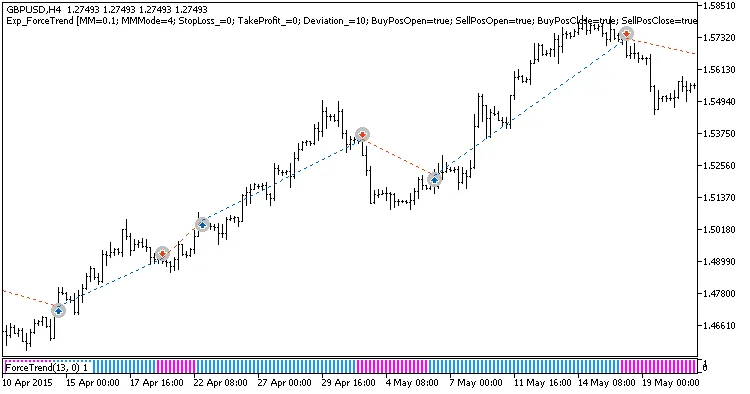
Fig. 1. Examples of deals on the chart
When we analyzed the testing results for the year 2015 using the GBPUSD on an H4 timeframe, the performance was quite revealing:
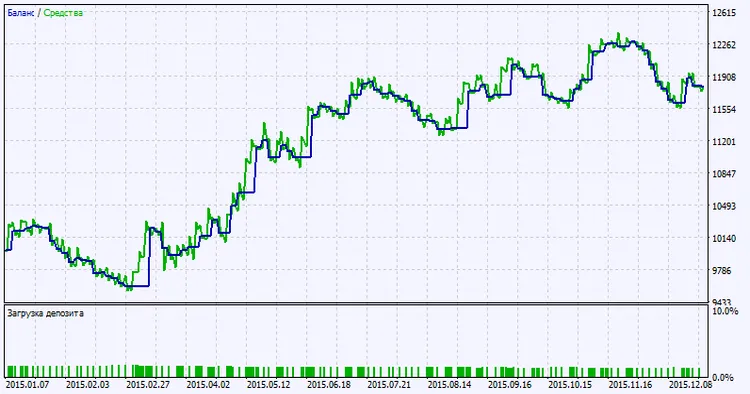
Fig. 2. Testing results chart




Comments 0