
Hey there, fellow traders! Today, we're diving into an exciting Expert Advisor (EA) for MetaTrader 5 known as Exp_BlauTVI_Tm. This EA is designed to leverage the signals from the trend-following indicator BlauTVI, and it even gives you the flexibility to set a specific trading time interval.
The magic happens when a bar closes, and the indicator histogram changes direction, signaling a potential trade. Let’s break down how you can customize it for your trading sessions.
Setting Your Trading Time
You can easily specify the trading hours in the input parameters. Here’s a quick look at what you’ll need:
input bool   TimeTrade=true;      //Enable trading in the specified interval
input HOURS  StartH=ENUM_HOUR_0;  //Trading starts at (hours)
input MINUTS StartM=ENUM_MINUT_0; //Trading starts at (minutes)
input HOURS  EndH=ENUM_HOUR_23;   //Trading ends at (hours)
input MINUTS EndM=ENUM_MINUT_59;  //Trading ends at (minutes)
You’ll have two sets of variables for both the start and end times. By default, the EA is set to trade from 00:00, closing all positions at 23:59. If you set a start time that’s later than your end time, don’t worry! The EA will close your positions the next day at the specified time.
Compiling the EA
To ensure everything runs smoothly, make sure the compiled file of the BlauTVI.ex5 indicator is in the terminal_data_directory\MQL5\Indicators folder. When you compile the EA, it references the indicator as a resource, so it’s not strictly necessary for it to be in the terminal folder.
Utilizing the TradeAlgorithms Library
Also, keep in mind that the TradeAlgorithms.mqh library file allows you to use EAs with brokers that offer a nonzero spread and lets you set Stop Loss and Take Profit levels right alongside opening your positions. You can grab other versions of this library here.
The testing results below used the default input parameters of the EA, and interestingly, no Stop Loss or Take Profit was applied during the tests.
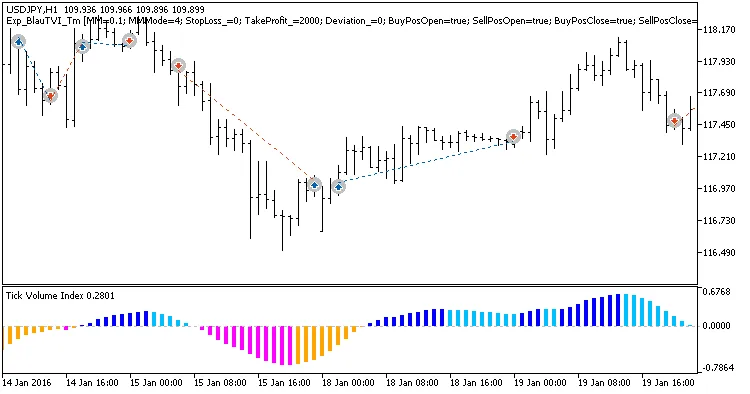
Fig 1. Examples of deals on the chart
2016 Testing Results: USDJPY H1
Here’s a snapshot of the testing results from 2016 for the USDJPY H1:
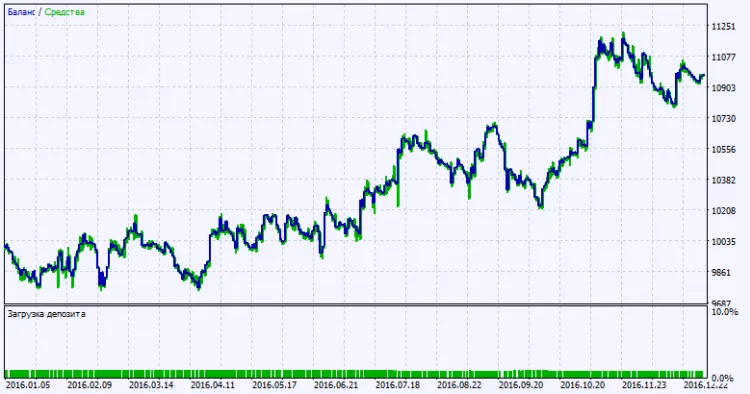
Fig. 2. Testing results chart




Comments 0