
Hey there, fellow traders! Today, I want to introduce you to the Exp_TSICloud Expert Advisor. This nifty tool is crafted around the color changes of the TSICloud indicator. You’ll get trading signals whenever there's a shift in the cloud color at the close of a bar, making it a handy companion in your trading journey.
One of the cool features of this EA is its ability to trade against the prevailing trend:
input bool Invert=false; //Trade against a trend
To get started, you'll need the compiled indicator file TSICloud.ex5. Just save it in your <terminal_data_folder>\MQL5\Indicators directory, and you're good to go!
Also, keep in mind that the TradeAlgorithms.mqh library file comes in handy when using EAs with brokers that offer a non-zero spread. Plus, it allows you to set up your Stop Loss and Take Profit right when you open a position. You can check out more variations of this library by following this link: Trade Algorithms.
For the tests shared below, the default input parameters of the Expert Advisor were utilized, and interestingly, neither Stop Loss nor Take Profit settings were applied during these tests.
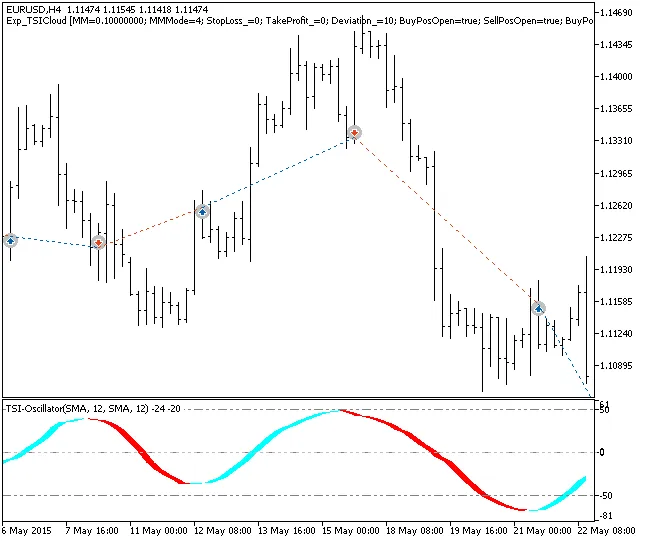
Fig.1. Examples of trades on the chart
As for the testing results for 2015 with the EURUSD on the H4 timeframe:
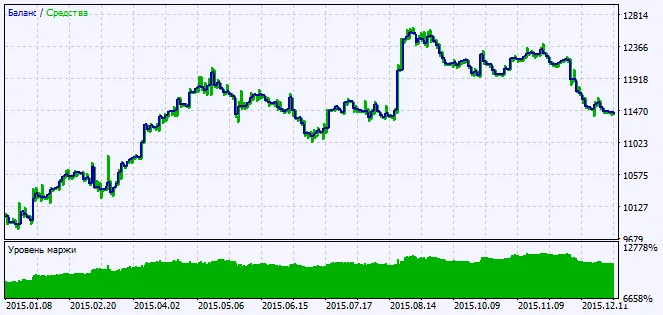
Fig.2. Charts of testing results




Comments 0