
Are you ready to take your trading game to the next level? Let's dive into the world of the BinaryWave StDev trading system, designed for use with MetaTrader 5. This system is all about leveraging the signals from the BinaryWave StDev indicator. Essentially, a signal is triggered at the close of a bar when a colored point appears on the indicator. If the indicator changes direction against your open position, that's your cue to exit the market.
To get started, you'll need to have the compiled indicator file, BinaryWave_StDev.ex5, saved in your <terminal_data_folder>\MQL5\Indicators directory. This is crucial for the Expert Advisor (EA) to function correctly.
One noteworthy feature is that the TradeAlgorithms.mqh library lets you use Expert Advisors with brokers offering nonzero spreads. Plus, it gives you the flexibility to set your Stop Loss and Take Profit right when you open a position. If you're looking for more options, you can grab additional versions of this library at this link: Trade Algorithms.
In the tests conducted (shown below), we utilized the default input parameters of the EA, and interestingly, neither Stop Loss nor Take Profit were implemented during these tests.
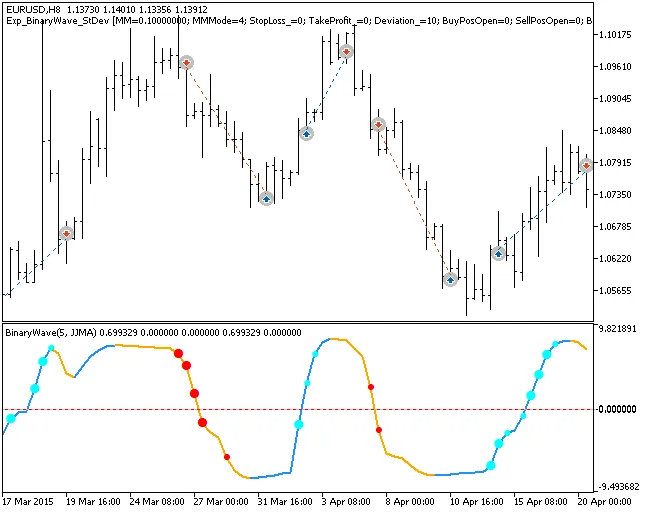
Fig. 1. Examples of trades on the chart
Now, let’s look at the testing results for 2015 using the EURUSD H8:
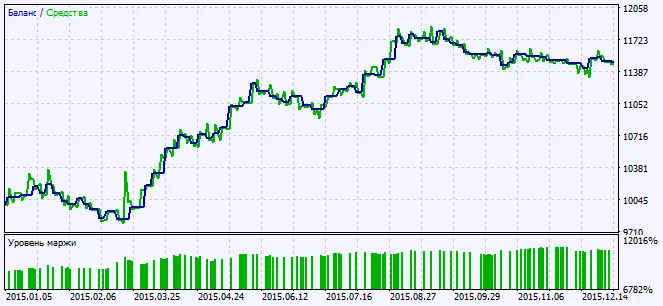
Fig. 2. Charts of testing results




Comments 0