
Hey traders! If you're on the lookout for a powerful tool to enhance your trading strategy, let me introduce you to the Exp_CronexAO EA. This expert advisor is built on the signals generated by the CronexAO oscillator, which is a favorite among many traders for its effectiveness.
So, how does it work? The EA generates a signal when a bar closes and there's a change in the color of the indicator's cloud. It's all about timing, and this EA helps you catch those perfect moments.
For the Exp_CronexAO to work like a charm, make sure you place the compiled indicator file CronexAO.ex5 in your terminal data folder under MQL5/Indicators. This step is crucial for smooth operation.
A quick tip: the TradeAlgorithms.mqh library file is a game changer. It allows you to use Expert Advisors with brokers that offer non-zero spreads and lets you set your Stop Loss and Take Profit right when you open a position. You can find more versions of this library here: Trade Algorithms.
During the tests showcased below, we used the default input parameters of the Expert Advisor, and it's worth noting that neither Stop Loss nor Take Profit was used during these tests.
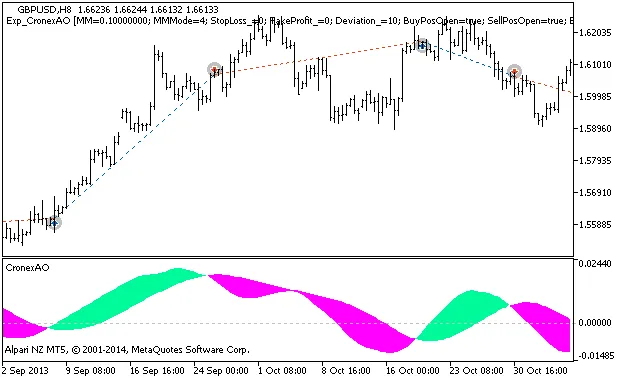
Figure 1: Instances of deal history on the chart.
Now, let’s dive into the testing results for GBPUSD on the H8 timeframe from 2013:
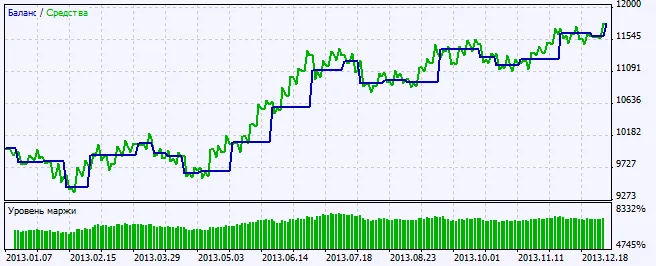
Figure 2: Chart of testing results.




Comments 0