Technical Indicator

Unlocking the Fibonacci Spiral: Your Ultimate Trading Tool
MetaTrader4
Unlocking the Fibonacci Spiral: Your Ultimate Trading Tool

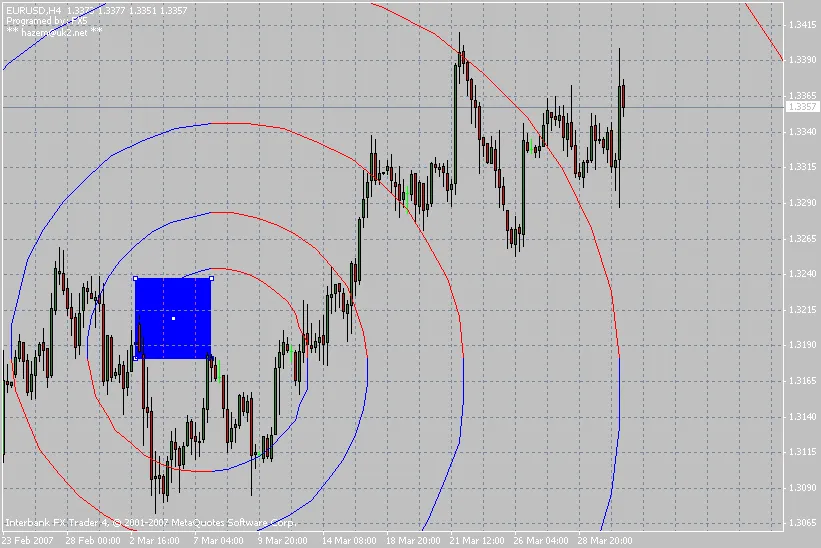
The Fibonacci spiral is a game-changer for traders, stemming from the fascinating Fibonacci sequence. Many traders swear by it as the go-to tool for predicting market behavior, and it’s not just a theory—it’s evident in nature as well, from seashells to flower petals, and even in the vastness of galaxies. What is the Fibonacci Spiral? This unique spiral grows from the center, expanding in the Fibonacci ratio of 1.618, known as the golden ratio. Each complete turn of the spiral increases its size according to this ratio. How to Use the Fibonacci Spiral Indicator Our Fibonacci spiral indicator is designed to plot this golden spiral on your trading charts. It’s user-friendly and adaptable, but you need to understand its initial settings: Radius: This is the initial radius for drawing the spiral. Golden Spiral Cycle: This parameter indicates how many cycles the spiral completes before it grows according to the golden ratio (default is set to 1). Clockwise Spiral: If set to true, the spiral will plot clockwise; if false, it will plot counterclockwise. Spiral Colors: Customize your spiral with different colors using spiralColor1 and spiralColor2. Once the indicator is initialized, it will draw a square along with the spiral. If the square isn’t scaled correctly, you can adjust it, and the spiral will update on the next price tick. Keep resizing the square until you achieve the perfect spiral shape. I hope you find this indicator as useful as I do. Happy trading!

2007.04.02
Mastering the MadroGoldenFilter: Your Guide to Effective Trading Signals
MetaTrader4
Mastering the MadroGoldenFilter: Your Guide to Effective Trading Signals

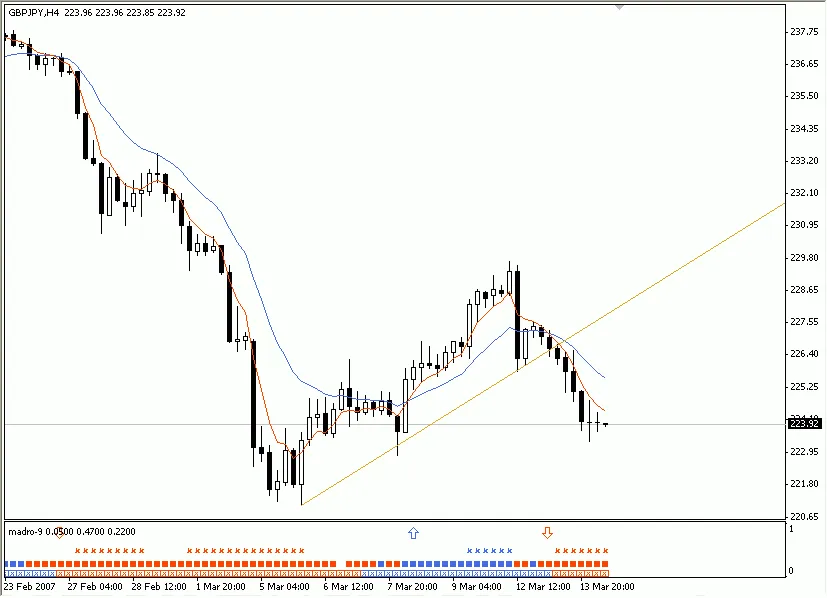
Welcome back, fellow traders! Today, we're diving into an incredibly useful tool for enhancing our trading strategies—the MadroGoldenFilter. This indicator provides four distinct signals to help us filter through our trades effectively. Let’s break it down! 1. **Broken Trend** Buy Signals: 1. Breaking the Downtrend. 2. EMA9 crosses above EMA30. 3. Momentum value is greater than 100. Sell Signals: 1. Breaking the Uptrend. 2. EMA9 crosses below EMA30. 3. Momentum value is less than 100. The lower part of this indicator shows momentum, and the arrows indicate the crossing of two moving averages. 2. **Golden Trend** Buy Signals: 1. Breaking the Downtrend. 2. EMA5 crosses above SMMA15 (Smooth Moving Average). 3. DeMarker value is greater than 0.5 and Force Index is greater than 0. Sell Signals: 1. Breaking the Uptrend. 2. EMA5 crosses below SMMA15. 3. DeMarker value is less than 0.5 and Force Index is less than 0. The middle section of the indicator gives us the critical signal, with arrows showing the crossing of the two moving averages. 3. **Golden Cross** Buy Signals: 1. EMA5 crosses above EMA15. 2. RSI value is greater than 50, with MACD crossing up and ADX crossing up. Sell Signals: 1. EMA5 crosses below EMA15. 2. RSI value is less than 50, with MACD crossing down and ADX crossing down. This section provides crucial signals, with arrows pointing to the moving average crossings. 4. **Golden Lines** When the price breaks through a strong support or resistance level, we can get a solid confirming signal for a Buy or Sell by analyzing the three signals from the indicator. In conclusion, the MadroGoldenFilter is a powerful ally in your trading toolkit. By using these signals effectively, you can improve your decision-making and potentially boost your trading success. Happy trading!

2007.03.15
Boost Your Trading with ZeroLag Stochs: A Game-Changer for Traders
MetaTrader4
Boost Your Trading with ZeroLag Stochs: A Game-Changer for Traders

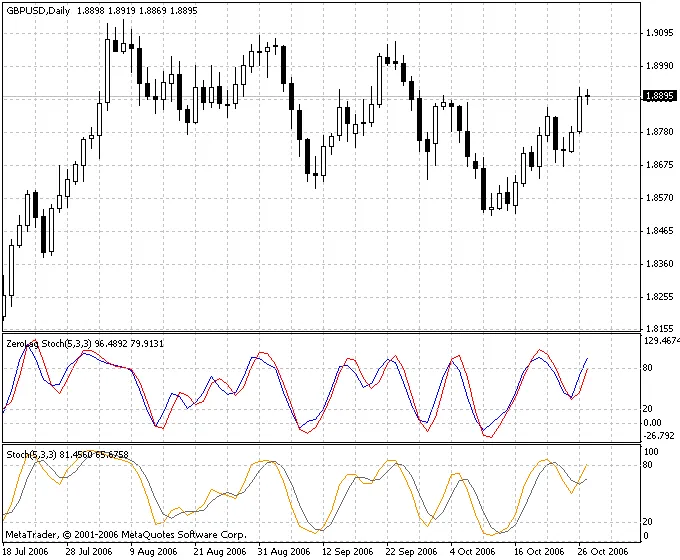
The ZeroLag Stochs is a powerful indicator based on George C. Lane’s Stochastic Oscillator, but with a twist—it operates with zero delay. This means it can provide you with trading signals several bars earlier than the standard Stochastic Oscillator, giving you an edge in your trading decisions. One of the standout features of ZeroLag Stochs is its ability to clearly highlight divergences and convergences, which are crucial for identifying potential market reversals. Let’s break down how this indicator works and why it could be a game-changer for your trading toolkit. How ZeroLag Stochs Works Fast%K(i): This is calculated as follows: Fast%K(i) = 100*(Close(i) - MaxHigh(N)) / (MaxHigh(N) - MinLow(N)); %K(i): This is derived from the Fast%K and is calculated using: %K(i) = 2*MA(Fast%K(i), N) - MA(MA(Fast%K(i), N), N); %D(i): The smoothed version of %K, calculated as: %D(i) = 2*MA(%K(i), P) - MA(MA(%K(i), P), P); Here’s a quick summary of the terms used in these formulas: Fast%K(i): Fast %K value for the current bar; Close(i): Closing price of the current bar; MaxHigh(N): Maximum high over the last N periods; MinLow(N): Minimum low over the last N periods; MA: Moving average; N: The period range for high/low calculations; P: Smoothing period for the %D value. In summary, if you're looking to enhance your trading strategy, ZeroLag Stochs could be the tool you need to stay ahead of the market. With its ability to deliver signals faster and more clearly, you'll be better equipped to make informed trading decisions.

2006.10.27
Understanding Point & Figure Charts: A Trader's Guide
MetaTrader4
Understanding Point & Figure Charts: A Trader's Guide

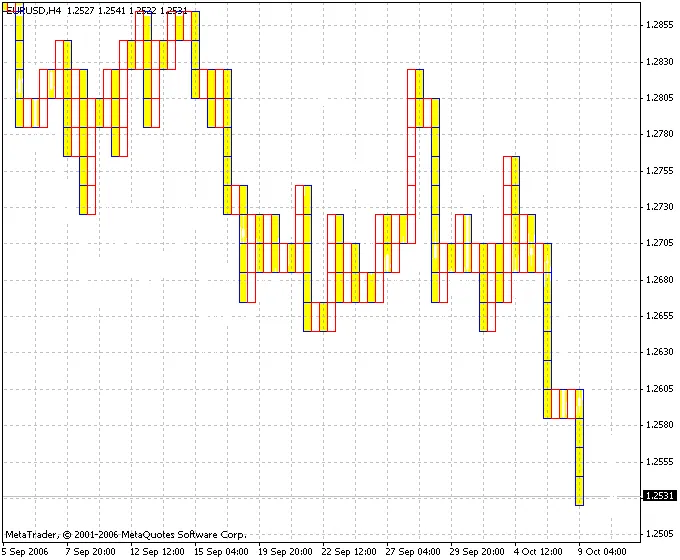
Welcome back, fellow traders! Today, we’re diving into the fascinating world of Point & Figure (P&F) charts. These charts are a bit different from the standard price charts you’re used to, as they focus solely on price movements and completely ignore time. What Are Point & Figure Charts? Unlike traditional charts that plot time on the X-axis and price on the Y-axis, P&F charts display price changes on both axes. This unique approach allows traders to see the market's movements without the noise of time. Understanding the X's and O's In P&F charts, you’ll notice two symbols: “X” and “O”. The “X” (represented by a red mark) indicates price increases by a specific value known as the RazmBox. Conversely, the “O” (shown as a yellow mark) signifies price decreases by the same value. If the price changes by an amount less than this RazmBox, neither Xs nor Os will be plotted. Columns and Trends Each column on a P&F chart can only contain either Xs or Os, but not both. To transition between columns (for instance, from a column of Xs to a column of Os), the price must shift by a specified amount in the opposite direction. This change in columns reflects a shift in the market trend. Customizing Your Chart If you're looking to hide the price chart for a cleaner look, you can adjust the background color in the chart window settings. Just head to the “Properties” menu in the chart window, click on the “Colors” tab, and modify the fields for “Bar Up,” “Bar Down,” “Bull Candle,” “Bear Candle,” and “Line.” Key Parameter RazmBox: This is the base value used to determine the increments for Xs and Os. There you have it, folks! Point & Figure charts can be a powerful tool in your trading arsenal. By focusing on price movements and ignoring time, you can gain a clearer view of market trends. Happy trading!

2006.10.16
First Previous 389 390 391 392 393 394 395 396 397 398 399 Next Last